The GC wants your submittal schedule by Friday. You have 47 spec sections to review.
Building a submittal register shouldn't take days. With the right process, you can extract a complete list in about 30 minutes.
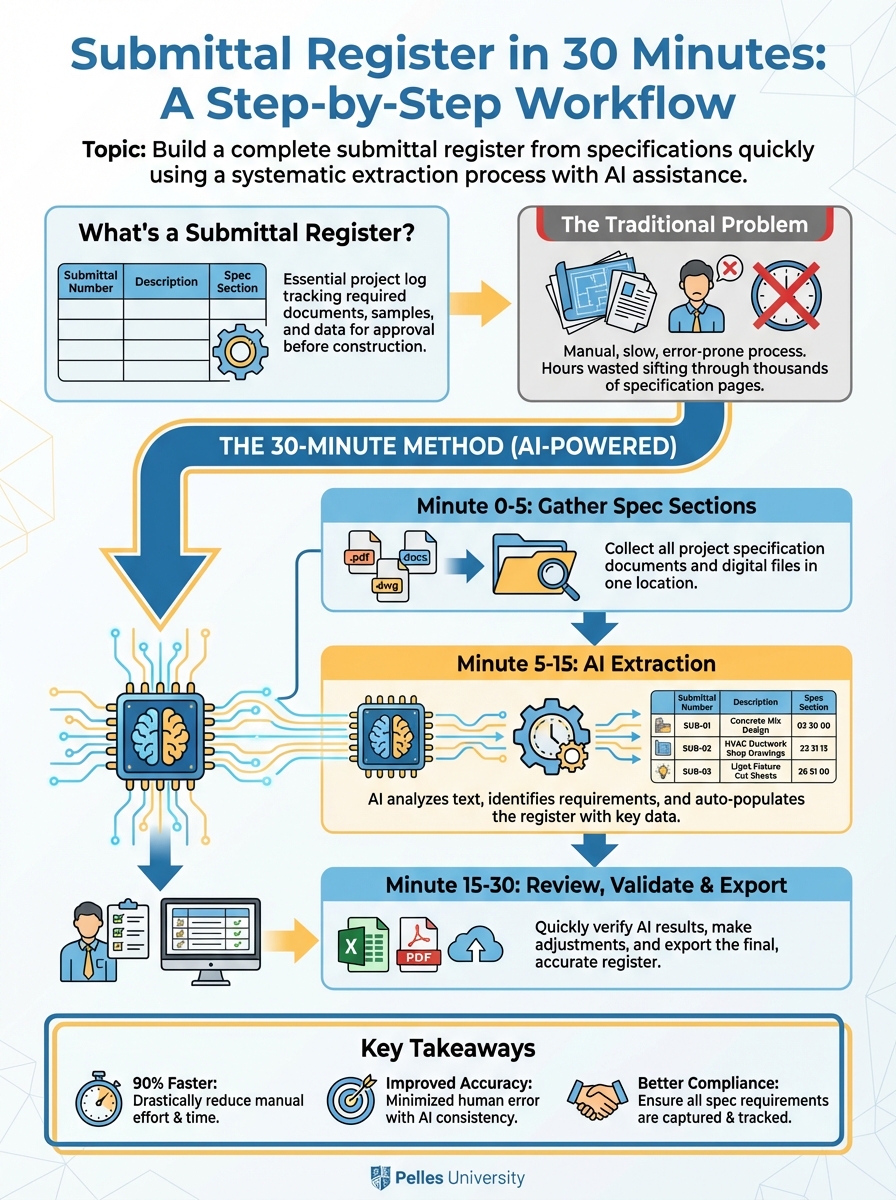
What's a Submittal Register?
A submittal register lists every submittal required by the contract, including:
- Submittal number
- Description
- Spec section
- Required timing
- Status
- Lead time impact
It works as a planning tool, listing everything you need to submit, and as a tracking tool, showing where each item stands in the process.
The Traditional Problem
Most teams build submittal registers by:
- Reading every spec section
- Finding submittal paragraphs
- Manually typing each requirement
- Hoping they didn't miss anything
This takes hours and often misses requirements buried in execution sections.
The 30-Minute Method
Minute 0-5: Gather Spec Sections
Collect all spec sections for your scope. For MEP:
- Division 22 (Plumbing)
- Division 23 (HVAC)
- Division 26 (Electrical)
- Related sections (commissioning, controls, insulation)
Have PDFs ready or text extracted.
Minute 5-15: AI Extraction
Run each major section through AI:
Extract all submittal requirements from this specification section:

[Paste spec text]

For each submittal, provide:
1. Item description
2. Type (product data, shop drawing, sample, etc.)
3. Spec section reference
4. Any specific requirements mentioned

Format as a table I can paste into a spreadsheet.
Run this for each division. Combine the outputs.
Minute 15-25: Review and Organize
Clean up the extracted list:
Combine related items:
- "AHU product data" and "AHU shop drawings" might be one submittal package
Add project specifics:
- Connect generic "pump data" to specific schedule items (P-1, P-2, etc.)
Assign submittal numbers:
- Use a consistent system (by spec section or sequential)
Estimate lead times:
- Standard items: 1-2 weeks for approval
- Long-lead equipment: Note manufacturer lead time
Minute 25-30: Format and Finalize
Put into your standard template:
| Sub # | Description | Spec | Type | Lead Time | Due | Submit | Status |
|---|---|---|---|---|---|---|---|
| 23-001 | AHU-1,2 | 23 73 00 | PD+SD | 16 wk | 2/01 | - | Not Started |
| 23-002 | VAV Boxes | 23 36 00 | PD | 8 wk | 2/15 | - | Not Started |
| 23-003 | Ductwork | 23 31 13 | SD | - | 3/01 | - | Not Started |
The Submittal Register Template
Use these columns:
Identification:
- Submittal Number
- Revision (0, 1, 2, etc.)
- Description
- Spec Section
Requirements:
- Type (PD = Product Data, SD = Shop Drawing, SAM = Sample, CALC = Calculations)
- Division 01 reference (if additional requirements)
Timing:
- Equipment lead time (manufacturing)
- Required approval date (backed from install date)
- Actual submit date
- Approval date
Status:
- Status (Not Started, In Prep, Submitted, Approved, Approved as Noted, Revise/Resubmit)
- Notes
Sequencing by Lead Time
Not all submittals are equal. Prioritize based on:
Priority 1: Long-Lead Equipment (Submit Week 1-2)
- Custom AHUs (12-20 weeks)
- Chillers (16-24 weeks)
- Generators (20+ weeks)
- Custom switchgear (16-20 weeks)
Priority 2: Engineered Systems (Submit Week 2-4)
- Ductwork (for coordination)
- Piping systems
- Electrical distribution
Priority 3: Standard Equipment (Submit Week 3-6)
- Packaged equipment
- Pumps and motors
- Light fixtures
Priority 4: Finishing Items (Submit with Above)
- Diffusers and grilles
- Devices and trim
- Accessories
Connecting to the Schedule
Work backward from installation dates:
Install date: June 1
Equipment lead time: 12 weeks
Approval time: 2 weeks
Prep time: 1 week

Required submit date: February 15
If the schedule doesn't support this math, raise a flag early.
Common Submittal Register Mistakes
Mistake 1: Missing Section 01 33 00
Division 01 often has additional submittal requirements—format, number of copies, digital standards. Include in your register.
Mistake 2: Forgetting Closeout Submittals
O&M manuals, as-builts, and warranty documentation are submittals too. Add them to the register.
Mistake 3: One-and-Done
The register is a living document. Update status weekly. Add new submittals as they're identified.
Mistake 4: Not Tracking Resubmittals
When a submittal is rejected, increment the revision number and track the resubmittal separately.
Using the Register Daily
Weekly review:
- What's due this week?
- What's overdue?
- What's blocking long-lead releases?
Coordination meeting prep:
- Which submittals are we waiting on from the engineer?
- What's been approved that we can release for fabrication?
Schedule updates:
- If submittals are delayed, what's the install date impact?
- Do we need to escalate?
Using AI to Maintain the Register
When new specs or addenda arrive:
Compare this updated specification to the previous version.
Identify any new submittal requirements or changes to existing requirements.

[Paste old spec]
[Paste new spec]

List additions, deletions, and modifications.
This keeps your register current as documents evolve.
What's Next
A complete register is step one. The next step is integrating it with your project schedule—so submittal dates drive procurement dates and install dates automatically. If you're choosing where the register lives, our comparison of construction submittal software covers the main platforms, their prices, and which ones build the log from the spec for you.
TL;DR
- A submittal register can be built in 30 minutes using AI extraction from spec sections
- Prioritize by lead time—long-lead equipment submittals go first
- Work backward from install dates to set submit deadlines
- Track status weekly and update for resubmittals
- Don't forget Division 01 requirements and closeout submittals
Visual Summary
Test Your Knowledge
What is the primary purpose of a submittal register?
Interactive Learning
Select a term on the left, then match it with the definition on the right
Terms
Definitions