The project is 95% complete. The GC sends an email: "O&M manuals due in 10 days."
Now you're scrambling. Chasing manufacturer literature. Tracking down warranty certificates. Trying to remember what equipment got installed where.
This scramble is preventable.
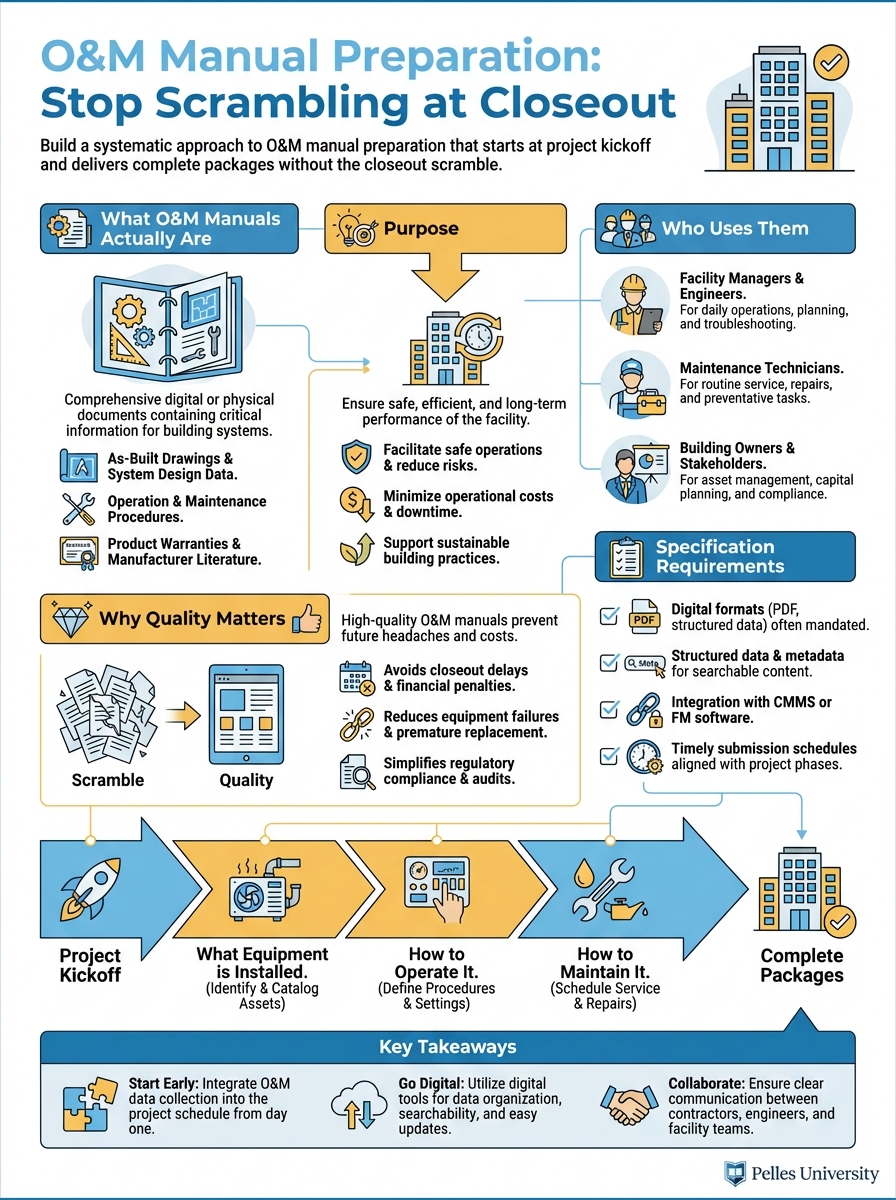
What O&M Manuals Actually Are
Purpose
Operations and Maintenance (O&M) manuals tell the building owner:
- What equipment is installed
- How to operate it
- How to maintain it
- How to troubleshoot problems
- Who to call for service
They're the instruction manual for the building systems you installed.
Who Uses Them
Facility managers: Daily operations and maintenance scheduling
Maintenance technicians: Troubleshooting and repairs
Building engineers: System optimization
Future contractors: Understanding existing systems
Your O&M manual may be referenced for the next 30 years.
Why Quality Matters
Poor O&M manuals:
- Generate calls to you for information
- Cause maintenance mistakes
- Create liability exposure
- Damage your reputation
Quality O&M manuals:
- Enable proper maintenance
- Reduce post-completion support burden
- Demonstrate professionalism
- Build owner confidence
Specification Requirements
Finding the Requirements
O&M requirements typically appear in:
Division 01 (General Requirements):
- Section 01 78 23: Operation and Maintenance Data
- Section 01 78 36: Warranties
- Section 01 79 00: Demonstration and Training
Technical sections:
- Each equipment specification section may have additional requirements
Read both Division 01 and your technical sections carefully.
Common Requirements
Format:
- Binder type and size
- Tab organization
- Digital format requirements
- Number of copies
Content:
- Product data for all equipment
- Maintenance procedures
- Parts lists and sources
- Wiring and control diagrams
- Warranty information
Timing:
- Draft submission for review
- Final submission deadline
- Training completion
Sample Requirement Language
From a typical specification:
"Assemble O&M data into durable binders with identification on front cover and spine. Organize by specification section. Include equipment-specific information including nameplate data, installed location, and as-built settings."
The phrase "equipment-specific" is key—generic literature isn't enough.
Building the System
Start at Kickoff
During submittal processing:
- Create O&M folder structure matching spec sections
- As submittals are approved, file O&M-relevant content
- Note what's missing from each submittal
- Request missing information from vendors
Don't wait for closeout to start collecting.
Track Progress
Create an O&M tracking log:
| Spec Section | Equipment | Submittal | O&M Status | Missing Items |
|---|---|---|---|---|
| 23 05 00 | Hangers/Supports | Approved | Partial | Seismic certification |
| 23 31 13 | Ductwork | Approved | Complete | - |
| 23 34 00 | HVAC Fans | Approved | Partial | Wiring diagrams |
| 23 73 00 | Air Handling Units | Approved | Partial | Control sequences |
Review monthly. Chase missing items early.
File Organization
Physical binders:
Volume 1 - Mechanical
  Tab 1: Section 23 05 00 - Common Work
  Tab 2: Section 23 21 00 - Hydronic Piping
  Tab 3: Section 23 31 00 - HVAC Ducts
  Tab 4: Section 23 34 00 - HVAC Fans
  Tab 5: Section 23 73 00 - Air Handling Units
  ...
Digital folders:
O&M Manuals/
  01-Mechanical/
    23-05-00_Common-Work/
    23-21-00_Hydronic-Piping/
    23-31-00_HVAC-Ducts/
    ...
  02-Electrical/
    26-05-00_Common-Work/
    26-24-00_Switchboards/
    ...
Mirror the spec organization exactly.
Content Requirements
For Each Piece of Equipment
Basic information:
- Equipment tag/designation
- Manufacturer and model
- Serial number
- Location in building
- Specification section reference
Technical documentation:
- Product data sheet
- Installation instructions
- Operation instructions
- Maintenance requirements
- Troubleshooting guide
- Parts list
Project-specific:
- Nameplate data (actual ratings)
- As-built settings and setpoints
- Control sequences
- Wiring diagrams (as-installed)
Equipment-Specific Sheets
Create a cover sheet for each major piece of equipment:
EQUIPMENT DATA SHEET

Equipment Tag: AHU-1
Description: Air Handling Unit
Manufacturer: Carrier
Model: 39M10
Serial Number: 1234567890
Location: Mechanical Room 101
Specification Section: 23 73 00

Design Conditions:
  Airflow: 5,000 CFM
  Cooling Capacity: 15 tons
  Motor HP: 7.5

As-Built Settings:
  Supply Air Temp Setpoint: 55°F
  Static Pressure Setpoint: 1.5" WC
  Economizer Changeover: 55°F OAT

Local Representative:
  Company: ABC Mechanical Supply
  Contact: John Smith
  Phone: (555) 123-4567
This makes the generic manufacturer literature specific to your installation.
Maintenance Schedules
Compile maintenance requirements into a usable format:
| Equipment | Daily | Weekly | Monthly | Quarterly | Annual |
|---|---|---|---|---|---|
| AHU-1 | Check filters | Check belts | Lube bearings | Inspect coils | Full PM |
| Pumps | Check operation | Check seals | Check alignment | Rebuild | |
| VAV Boxes | Check operation | Calibrate |
Owners appreciate consolidated maintenance information.
Warranty Summary
Create a warranty summary page:
| Equipment | Warranty Period | Start Date | Expiration | Contact |
|---|---|---|---|---|
| AHU-1 | 1 year parts | 03/15/25 | 03/15/26 | Carrier (800) 555-1234 |
| AHU-1 Compressor | 5 year | 03/15/25 | 03/15/30 | Carrier (800) 555-1234 |
| Controls | 2 year | 03/15/25 | 03/15/27 | Trane (800) 555-5678 |
Include warranty certificates behind the summary.
Common Problems
Problem: Generic Literature Only
Symptom: O&M consists of manufacturer brochures with no project-specific information
Solution: Create equipment data sheets with installed information. Add nameplate data, settings, and locations to generic documentation.
Problem: Missing Documentation
Symptom: Submittals were approved but O&M content wasn't included
Solution: Start tracking at submittal approval. Request missing content immediately, not at closeout.
Problem: Disorganized Content
Symptom: Information exists but can't be found
Solution: Use consistent organization matching spec sections. Create tables of contents. Use clear labeling.
Problem: Outdated Information
Symptom: O&M doesn't reflect as-built conditions
Solution: Update O&M content when changes occur. Incorporate as-built information from field.
Problem: Last-Minute Scramble
Symptom: Two weeks before closeout, nothing is assembled
Solution: Monthly O&M status reviews. Progressive assembly throughout project.
Working with Vendors
Setting Expectations
At purchase order:
- Specify O&M requirements
- Reference specification sections
- Include format requirements
- Set delivery timeline
Example PO language:
"Provide O&M documentation per specification Section 01 78 23 including product data, maintenance procedures, parts lists, and wiring diagrams. Submit with equipment delivery."
Following Up
If vendor O&M is incomplete:
- Document what's missing specifically
- Reference PO and spec requirements
- Set deadline for completion
- Escalate to manufacturer if needed
Make this a procurement issue, not a closeout issue.
Control Contractors
Controls documentation requires special attention:
- Points lists with descriptions
- Sequence of operations
- Graphic screenshots
- Trending setup
- Alarm configurations
- Network architecture
Get commitments for this documentation in the controls contract.
Digital Delivery
PDF Requirements
Most projects now require digital O&M:
Organization:
- Bookmarked PDF files
- Consistent file naming
- Hyperlinked table of contents
- Searchable text (OCR if needed)
File naming convention:
[Section#]_[Description]_[Equipment].pdf
Example: 23-73-00_AHU_ProductData.pdf
Building Management System Integration
Some owners want O&M linked to their BMS or CMMS:
- Equipment asset numbers
- Standardized naming
- Maintenance procedure codes
- Spare parts integration
Ask about these requirements early.
Cloud Delivery
Requirements may include:
- Specific platform (Procore, Box, etc.)
- Folder structure
- Access permissions
- Retention requirements
Understand the delivery method before assembly.
Quality Review
Self-Check Before Submission
Review each section for:
Completeness:
- All specified equipment covered
- All required documents included
- Equipment-specific data added
- Warranties included
Accuracy:
- Model numbers match installed
- Settings match as-built
- Locations are correct
- Contacts are current
Format:
- Organization matches requirements
- Tabs and dividers correct
- Cover and spine identified
- Page numbers if required
Draft Submission
Submit draft O&M for review before final:
Benefits:
- Identify missing content
- Clarify format expectations
- Avoid rejection at closeout
- Time to obtain missing items
Request draft review 60-90 days before closeout.
Using AI for O&M Preparation
Creating Equipment Sheets
Create an equipment data sheet template for an air handling unit
that includes:

- Basic identification (tag, manufacturer, model, serial, location)
- Design conditions (CFM, capacity, motor HP)
- As-built settings section
- Local representative contact section
- Reference to O&M binder location

Format for printing on one page.
Compiling Maintenance Schedules
Based on this manufacturer maintenance literature, create a
consolidated maintenance schedule table:

[Paste manufacturer maintenance requirements]

Format as:
- Equipment type
- Daily tasks
- Weekly tasks
- Monthly tasks
- Quarterly tasks
- Annual tasks
Checking Completeness
Review this O&M table of contents against the specification
sections listed below. Identify any missing items:

Table of Contents:
[Paste your TOC]

Required Specification Sections:
[Paste spec section list]

Note any gaps or potential missing content.
Timeline
Project Start (Month 1)
- Review spec requirements for O&M
- Create folder structure
- Set up tracking log
- Communicate requirements to vendors
During Construction
- File O&M content as submittals are approved
- Track missing items
- Follow up with vendors
- Collect as-built information
90 Days Before Closeout
- Complete review of tracking log
- Submit draft for review
- Chase all missing items
- Begin assembly
30 Days Before Closeout
- Incorporate review comments
- Complete equipment data sheets
- Compile warranties
- Final assembly and QC
At Closeout
- Submit final O&M
- Deliver training materials
- Obtain acceptance
What's Next
Complete O&M manuals are one part of closeout. They work alongside as-built drawings, warranty documentation, and training to give the owner everything they need to operate and maintain your installed systems. The MEP project closeout checklist lists every closeout item and when to start collecting it.
TL;DR
- Start O&M collection at project kickoff, not at closeout
- Create equipment-specific cover sheets—generic literature isn't enough
- Organize by specification section to match project manual structure
- Track progress monthly and chase missing items early
- Submit draft for review 60-90 days before closeout
- Include warranties, maintenance schedules, and contact information
Visual Summary
Test Your Knowledge
When should O&M manual preparation begin?
Interactive Learning
Select a term on the left, then match it with the definition on the right
Terms
Definitions